
AI Integration for E-Commerce: Real-World Architectures, Workflows, and Pitfalls
One client saw a 40% jump in average order value after replacing keyword search with AI-powered recommendations. Here's how we built it, what actually works in production, and what to look for if you're evaluating AI for your e-commerce platform.
Why AI-Driven E-Commerce Is No Longer Optional
One client saw up to a 40% increase in average order value after switching from keyword-based search to AI-powered, context-aware recommendations. That single change — moving from exact keyword matching to semantic product understanding — delivered measurable ROI within the first quarter.
AI in e-commerce isn't a buzzword anymore. It's a measurable revenue lever. But most implementations fail for the same reason: they're either toy demos or over-engineered science projects with no clear ROI path.
This post breaks down what actually works in production — the architectures, the real-world outcomes, and the mistakes that quietly kill your ROI before you notice.
Practical Pillars: AI That Moves the Needle
1. Contextual Product Recommendations
Legacy engines use collaborative filtering. Modern LLMs (OpenAI, Anthropic) understand context, intent, and nuance—if you embed your catalog in a vector DB, recommendations become truly relevant.
Example: Contextual Recommendations with OpenAI
// src/lib/recommend.ts
import { openai } from "./openaiClient";
import { getCatalogEmbeddings } from "./vectorDb";

export async function recommendProducts({ browsingHistory, cartItems, catalog }) {
  const embeddings = await getCatalogEmbeddings(catalog);
  const response = await openai.chat.completions.create({
    model: "gpt-4",
    messages: [
      {
        role: "system",
        content: `You are a product recommendation engine. Given the customer's browsing history and cart, suggest 3 complementary products from our catalog.`,
      },
      {
        role: "user",
        content: `Browsing: ${browsingHistory}. Cart: ${cartItems}. Catalog: ${embeddings}`,
      },
    ],
  });
  return response.choices[0].message.content;
}
Real-World Example: One client saw up to a 40% increase in average order value after switching from keyword-based to vector-based recommendations. The key: embed your catalog and let the LLM reason semantically.
2. AI-Powered Customer Support (RAG + Guardrails)
Chatbots can resolve 70–80% of queries if you:
- Use RAG (Retrieval-Augmented Generation) to ground answers in your docs
- Add guardrails to prevent hallucinations
- Escalate seamlessly to human agents when confidence is low
Architecture:
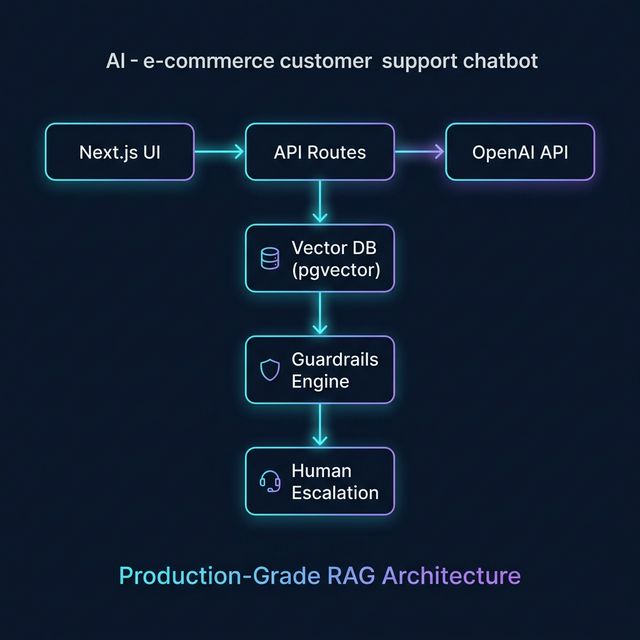
Implementation Tip: Use confidence scores and explicit fallback triggers. If the LLM isn’t sure, escalate—don’t let it guess.
3. Dynamic Pricing & Personalization
LLMs can analyze customer segments and historical market data to suggest pricing adjustments in batch or analysis mode — not real-time per-request (too slow and costly for that), but as a strategic layer feeding into your pricing engine. Combine with A/B testing for a feedback loop that optimizes conversion rates.
Example:
// src/lib/pricing.ts
export async function getDynamicPrice({ segment, product, marketData }) {
  // Use LLM to analyze segment and market
  // Return price suggestion
}
Production Workflow: From Idea to Launch
- Define the business goal (e.g., increase AOV, reduce support cost)
- Choose the right AI API (OpenAI, Anthropic, etc.)
- Embed your catalog/docs in a vector DB
- Build API routes for recommendations, support, pricing
- Add guardrails and escalation logic
- A/B test and measure against baseline
- Cache aggressively—LLM calls are expensive
Common Mistakes That Kill E-Commerce AI ROI
- Relying on keyword search as catalogs grow — keyword matching breaks down the moment customers search naturally. Semantic AI search converts; keyword search frustrates.
- Skipping guardrails on AI chatbots — an unguarded LLM giving wrong return policy info creates real legal and trust risk. Always constrain AI to your data.
- No human escalation path — chatbots that can't hand off to a human destroy customer confidence at the worst moment: when frustration is already high.
- No caching strategy — AI API calls are expensive. Without caching, a traffic spike can turn into a surprise $10K cloud bill. Budget and architect for this upfront.
- Not measuring before and after — if you can't compare conversion rate, AOV, or support ticket volume before and after AI deployment, you can't prove (or improve) ROI.
If You're a Founder or Product Lead
- Start with recommendations — highest ROI, lowest complexity, fastest to validate
- AI support bots need your data — a RAG-powered bot trained on your docs dramatically outperforms a general-purpose chatbot
- Set KPI baselines before you build — AOV, checkout abandonment, support ticket volume — measure first, then let AI move the needle
- Budget for iteration — the first version won't be perfect, and that's fine. Ship, measure, and tune.
If You're Evaluating a Developer to Build This
- Ask whether they've deployed AI features to production — demos and proofs-of-concept are very different from systems handling real traffic
- Ask how they handle hallucination risk — any developer worth hiring should have a guardrails and escalation story
- Ask how they measure success — ROI accountability separates engineers from vendors
Closing: AI That Moves the Needle, Not Just the Demo
The future belongs to platforms that treat AI as a core product lever — not a gimmick, not a chatbot bolted on after launch. The 40% AOV increase I mentioned at the top wasn't luck. It was the result of understanding the customer's catalog, their users' search behavior, and the architecture needed to make it reliable at scale.
If you're evaluating whether AI is right for your e-commerce platform — or you already know you want it and need someone who's shipped it — let's have a real conversation.
Want to discuss this further or work together?